Enterprise agents need more than access to documents to answer questions about a business. Identifying an account owner, finding a decision from Thursday's architecture review, or checking whether a contract renewal has been followed up requires context spread across messages, meetings, and files. Retrieving a few relevant passages doesn't always provide enough information.
Microsoft's Work IQ API reached general availability on June 16, 2026. It gives agents a way to query organizational context from Microsoft 365, invoke Copilot reasoning, take actions, and store working state. The release supports REST, Model Context Protocol (MCP), and Agent-to-Agent (A2A) integration.
How Work IQ differs from direct data access
Microsoft Graph already provides access to email, SharePoint documents, and calendar events. Work IQ sits above that data-access layer. Microsoft's description is that it maintains a semantic understanding of an organization: relationships between people, projects, decisions, and the information behind them.
According to Microsoft's announcement, the average Fortune 500 company has more than 600 terabytes of data across its Microsoft 365 tenant. That includes email threads, meeting recordings, chat histories, document drafts, collaboration patterns, and signals from line-of-business systems.
Microsoft says Work IQ continuously processes that information into structured organizational context. An API query can surface who has relevant knowledge, which decisions have been made and when, which projects are active, who owns them, and how teams collaborate. The intended benefit is less work retrieving raw files and assembling their meaning inside each agent.
That distinction is useful for agents expected to make decisions or carry out a workflow. Finding a document that mentions an account isn't the same as establishing who currently owns it or what action is due next.
Four API domains
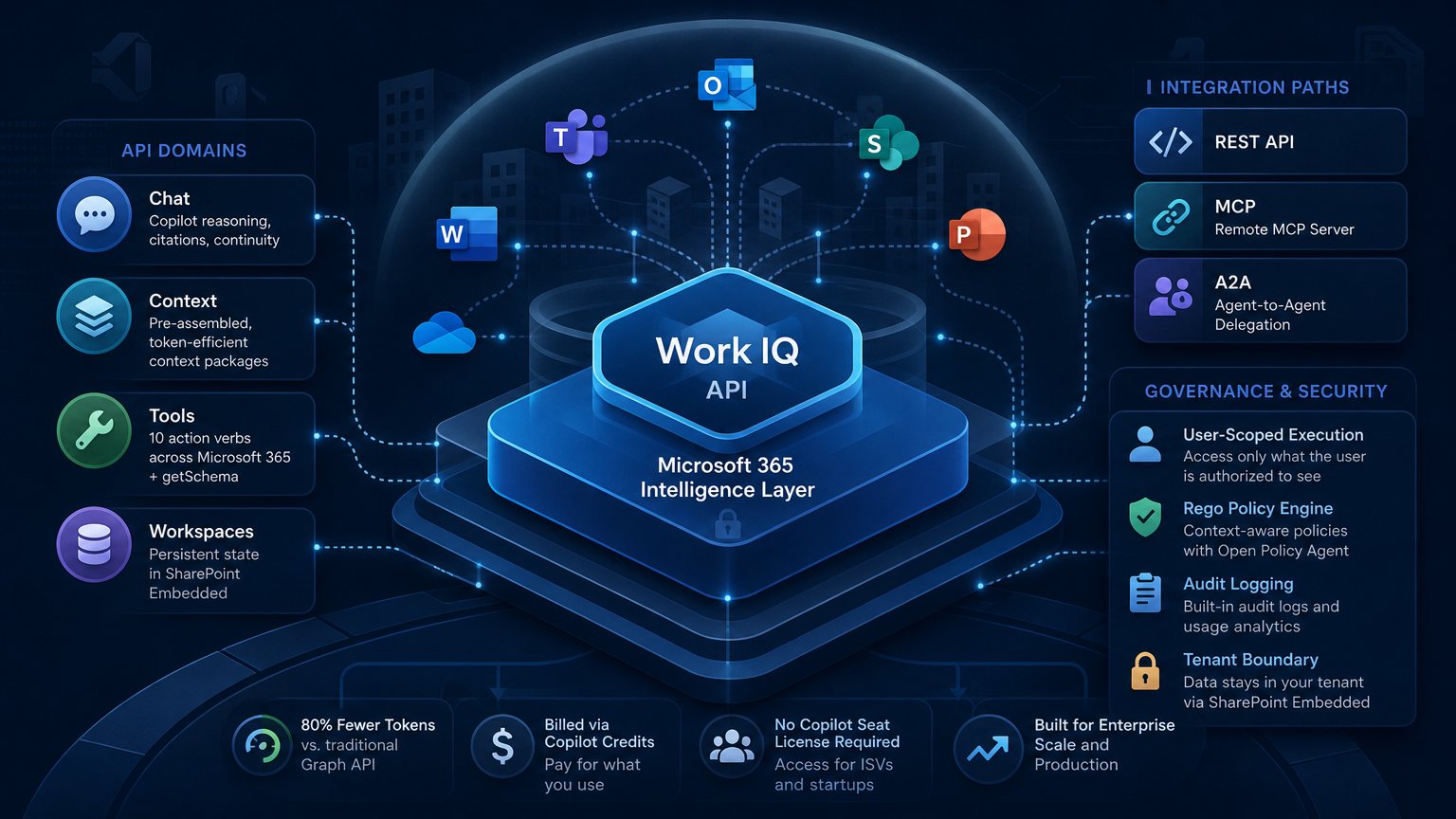
The GA release divides its capabilities into four domains, each serving a different part of an agent workflow.
- Chat provides programmatic access to Microsoft 365 Copilot's full reasoning capabilities. It returns responses with citations, maintains conversation continuity, and supports agent-to-agent delegation. This gives developers an authenticated, auditable way to invoke Copilot reasoning from another agent's workflow.
- Context supplies preassembled, agent-ready context packages in token-efficient formats. Rather than retrieving documents and stitching them together, an agent receives context prepared for its task. Microsoft claims this consumes 80% fewer tokens than traditional Graph API approaches at equivalent context depth. That could reduce a meaningful part of an agent's operating cost, depending on the workload.
- Tools maps ten generic action verbs, including fetch, create, and update, to resource paths across Microsoft 365. These support actions such as sending email, scheduling meetings, uploading to SharePoint, and posting to Teams. The
getSchematool lets an agent discover how organizational data is structured at runtime. That can reduce the need to hard-code schema assumptions, especially across tenants or organizational units with different configurations. - Workspaces provides persistent agent state backed by SharePoint Embedded. Microsoft describes this storage as remaining within the tenant boundary. Agents can retain intermediate results, working memory, and progress checkpoints across multi-step workflows without sending those stored artifacts to external systems.
Connecting through REST, MCP, or A2A
The REST API offers authenticated HTTP calls with standard JSON. It's a straightforward option for teams adding Work IQ to existing services, particularly those already built around Microsoft's APIs.
The redesigned remote MCP server provides a different route. MCP standardizes how models and agents discover and invoke external tools and capabilities. An MCP-compatible runtime, such as Claude Code, Cursor, or a custom orchestration framework, can connect to Work IQ without a bespoke Microsoft 365 connector.
A production remote MCP endpoint is a substantial endorsement of the protocol by Microsoft. For teams that already use MCP-based tool discovery, it also makes Work IQ easier to fit into their existing agent setup.
A2A supports delegation between agents, including passing context and task state from one agent to another. Its native availability at GA can reduce the amount of delegation infrastructure a team needs to build. It is most relevant when a workflow relies on several agents with different responsibilities rather than a single agent making tool calls.
Governance is central to production use
For production deployments, the governance model deserves the closest examination. Access to organizational context is useful only if the system respects the permissions and policies attached to that information.
Microsoft says Work IQ executes every request in a specific user's context. Each API call is limited to information that user is authorized to access. The API therefore isn't meant to expose data the user couldn't otherwise see. This can reduce the need for broad agent permissions or custom middleware that enforces per-user access.
Policy enforcement uses a Rego-based rules engine. Rego is the policy language used by Open Policy Agent, so teams already managing access controls with OPA should find the model familiar. Context-aware rules can change what the API surfaces for individual requests at query time, rather than relying only on static configuration.
Audit logging and usage analytics are available through the Microsoft 365 admin center. Teams facing SOC 2 or ISO 27001 scrutiny need to establish what data an agent accessed, when it accessed it, and on whose behalf. Built-in logging provides a starting point without requiring all of that instrumentation to be developed separately. Whether the available records satisfy a particular audit still needs to be evaluated.
Copilot Credits and the cost model
Work IQ is billed through Copilot Credits, the consumption currency also used by Copilot Studio and other Microsoft AI services. Its billing is independent of Microsoft 365 Copilot seat licensing. There is no separate Work IQ API subscription or per-user SKU; charges follow consumption.
The pricing model has two components:
- A fixed per-call cost for Tools invocations.
- A variable cost for Chat and Context that scales with the complexity of the context assembled.
Microsoft's claim of 80% lower token consumption for Context is relevant to the cost calculation, but it doesn't establish an equivalent reduction in the final bill. If the claimed efficiency holds for a team's workloads, context assembly could cost less than an approach built around retrieving raw data through Graph. Credit consumption still needs to be measured as usage grows.
Separating API consumption from Copilot seats also affects who can build and sell products on Work IQ. Independent software vendors and startups don't need their enterprise customers to already hold Microsoft 365 Copilot seat licenses. That removes a potential sales obstacle for third-party agents and broadens the potential customer base.
Where evaluation should start
Microsoft 365 has hundreds of millions of licensed seats globally, making this a relevant release for enterprise agent developers. Work IQ offers a production path to organizational context that might otherwise take months of custom Graph integration work.
Reported deployments cover several types of workflow. SLB is connecting subsurface domain data with enterprise workflow context inside agentic pipelines. HP is using Work IQ for document scanning and translation workflows. Miro is bringing real-time Microsoft 365 context into collaborative canvases to support AI features.
Platform and infrastructure teams should start with the controls that determine production approval: user-scoped execution, Rego policies, tenant-boundary workspace storage, and audit logging. These features address different concerns, so evaluating one doesn't settle the others.
For a smaller team or proof of concept, the remote MCP server is likely the quickest starting point, especially with an MCP-compatible runtime already in place. Connecting the server and configuring the runtime should require less integration work than assembling a full Graph-based context pipeline.
With the GA release available on June 16, teams can evaluate Work IQ for production rather than preview-only use. It can take on part of the context retrieval, delegation, storage, and policy work that developers otherwise build themselves. Agent logic, the choice of API domain for each task, and control of credit consumption remain the application's responsibility.